Building Content Driven Mobile Apps with Cloudflare Workers
Improving performance for Mockingbird Ministries' mobile app during a cross-platform rebuild.
When Mockingbird Ministries first asked for a rebuild of their mobile app (the “Mockingapp”), the initial needs were clear: refresh the UI, add cross-platform support for iOS and Android (the legacy app was iOS-only), and make a few podcasts available for listening that had launched since the legacy app’s initial release in 2018.
Initially, it seemed obvious that the all the changes would be made client-side: a rebuild from the ground up with React Native and Expo SDK. This was a significant change, and not without its own challenges (e.g. the native APIs for audio playback on both platforms, but that’s a story for another day).
With the exception of audio playback for podcasts, the Mockingapp is purely stateless: no sessions or user data. The legacy Mockingapp leaned on public Wordpress APIs exposed by the Mockingbird Website, and the public RSS feeds for all of the podcasts. The bloat of Wordpress APIs, however, and the addition of three new podcasts, introduced bottlenecks during beta testing that surfaced the need for a whole new backend, powered by Cloudflare Workers.
The Problem
Wordpress API
Wordpress APIs themselves can be extremely verbose, and, depending on your hosting configuration, very slow. A simple request looks like this:
https://mbird.com/wp-json/wp/v2/posts?page=1&per_page=20
Asking for the first page of posts with twenty items takes ~4 seconds, without any filters, and yields about ~400KB of JSON.
On launch, the app fetches the data in the background concurrently using Tanstack Query’s prefetchQuery function inside a useEffect hook.
async function prefetchHomeData() {
  await Promise.allSettled([
    queryClient.prefetchQuery({
      queryKey: ["latestPostsPreview"],
      queryFn: () => fetchLatestPosts({ page: 1, perPage: 5 }),
    }),
    queryClient.prefetchQuery({
      queryKey: ["weekInReviewPreview"],
      queryFn: () => fetchWeekInReviewPosts({ page: 1, perPage: 5 }),
    }),
    queryClient.prefetchQuery({
      queryKey: ["podcastsPreview"],
      queryFn: async () => {
        const result = await fetchAllPodcastsFirstPage(5);
        return result.podcasts.slice(0, 5);
      },
    }),
  ]);
}
Aside from the podcast fetch (discussed below), the prefetch hits two Wordpress endpoints: the main list of posts, and the filtered list of posts for “Another Week Ends” (the main list excludes “Another Week Ends”). The Mockingapp’s home screen displays the five latest entries from both sets of posts in separate carousels, and has dedicated screens for them for further browsing.
Since the home screen only loads the first 5 posts for each list, another option was to lazy load the rest when navigating to a dedicated screen. However, limiting the per_page query to 5 posts still takes ~2.5 seconds, and would require the app code to keep track of which posts had already been loaded into memory, as well as pagination state. On top of this, users will still need to wait a few seconds each time the app tried to load a new set of posts.
The verbosity of the response bodies and the API ergonomics present another challenge. A single post object contains 30 top-level properties, many of which are nested objects and arrays of nested objects. We needed to maintain a custom mapping of the fields we cared about that had to be reconciled at runtime on each app launch, discarding the majority of the response body.
Additionally, the Wordpress site is nearly 20 years old, hosted by a third-party, and filled with legacy customizations and limitations. Among these limitations was a hard limit on authors. This presented two challenges:
- The
/postsendpoint returns an integer value for theauthorproperty. Including_embed=truein the query only returns a link to theauthorresource, not an embedded author object itself. - The
authorstring value could be extracted from theyoast_head_jsonobject (from the Yoast SEO Plugin), returned by default. The Yoast SEO plugin was how the site’s editor’s “penciled in” guest authors. However, we could not request theyoast_head_jsonwhile excluding other nested properties without incurring further latency.
Working with the Wordpress APIs meant tolerating high latency, bloated responses, and data mappings that were awkward and brittle.
Podcast RSS Feeds
The legacy Mockingapp showcased 5 podcasts: PZ’s Podcast, The Mockingpulpit, The Mockingcast, Same Old Song, and Talkingbird. Since that time, Mockingbird’s offering’s have expanded to include The Brothers Zahl, The StoryMakers Podcast, and Terrible Parables.
While Fireside.fm delivers the RSS feeds in less than 100 milliseconds, the payload format is still XML. For five of these podcasts, that’s a payload of anywhere from 1000-2500KB each. Experiments with pagination and fiddling with concurrency still yielded load times of 5-10 seconds, and increasing technical debt led to bugs such as the app freezing when trying to load subsequent pages of podcasts. The app code was becoming littered with boilerplate, and increasingly difficult me (and my agents) to make sense of.
Enter Workers
In my previous job, I helped build the Workers platform at Cloudflare and had become a big fan of it. For the unfamiliar, Workers are Cloudflare’s serverless offering for JavaScript/WASM applications built on a bespoke open-source JavaScript runtime. Unlike AWS Lambda and other serverless platforms, Workers don’t have cold starts (i.e. increased latency) since they run on V8 isolates instead of VMs or containers, along with preloading the Worker in memory during the TLS handshake and performing some clever sharding techniques. They are also globally distributed on Cloudflare’s CDN (as opposed to region-bound), delivering content from servers near the user.
In software, I’m a big fan of “dumb” clients that do little more than render the data served to them. The Mockingapp’s client code had become riddled with boilerplate business logic that made it increasingly difficult to focus on refining the UI. The data model it needed was simple, and Workers enabled that simplicity.
Architecture for the Mockingbird Content API
The content API consists of several components:
- A REST API that serves content
- A cron trigger to refresh the content
- Queues for processing content from upstream sources
- A key-value store for storing the content at the network edge
At a high level, this is what the flow of data looks like. We will break down each piece below.
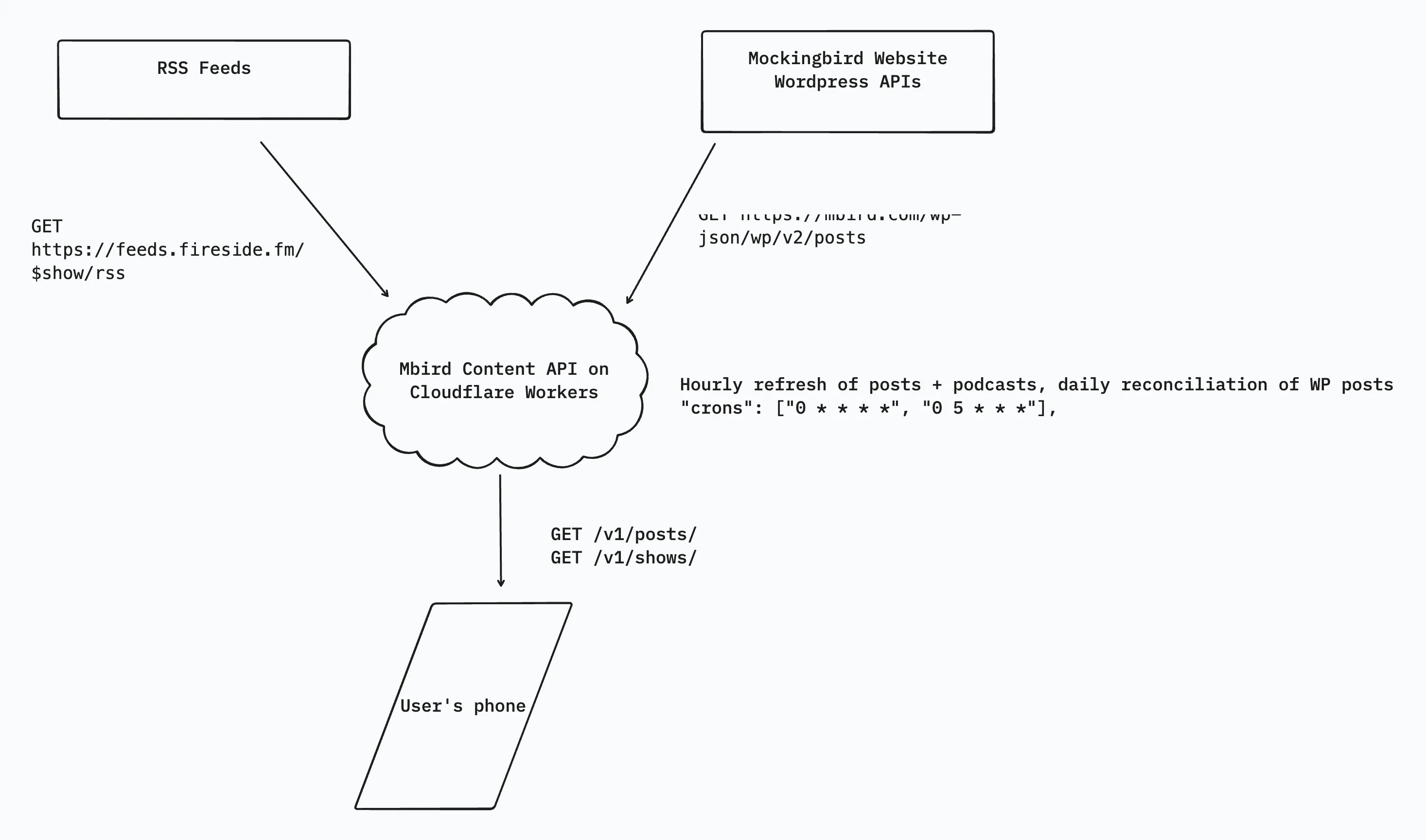
REST API
The REST API is pretty simple, and exposes two resources for users: shows and posts. It is built with Hono, which is passed in as the Worker’s fetch() handler. Both shows and posts also support pagination and fetching by ID. /posts also allows the app to query by category=wir for fetching just “Another Week Ends” posts.
Fetching the list of /posts returns an array of ArticleSummary objects, requesting /posts/:id returns an ArticleDetail, which extends the ArticleSummary with an additional contentHtml property, containing sanitized HTML.
Podcasts are handled a little differently. Requesting /shows/:id does not return a single episode, but a list of episodes for a given podcast. This is because the app’s UI allows users to filter the podcasts by shows they’re interested in. The ShowDetail object includes a list of Episodes. An individual Episode retains the original audioUrl from Fireside (we are not proxying the audio), so as to retain listening stats.
Content Synchronization
The API syncs data from the content origins using cron triggers, which invoke the Worker’s scheduled handler. The cron triggers run the Worker on two schedules:
"0 * * * *"for hourly syncing"0 5 * * *"]for daily reconciliation of stale (older than 60 days) posts
Additionally, the REST API exposes admin endpoints for manually refreshing content if a post is edited after publication.
Because data synchronization is fairly resource intensive, manually calling the refresh endpoint and executing the synchronization in the request lifecycle leads to timeouts and failure. The circumvent this limitation, refreshing content through both the automated scheduled and manual fetch handlers hands off execution to another handler in the Worker: queue.
The Worker publishes and listens to the same queue. Any time a refresh is triggered, the Worker puts a message on the queue, and the handler returns a response with the runId (each message to the queue has a unique runId). The Worker then synchronizes the content asyncronously, and stores the data in Workers KV.
Workers KV
Workers KV is Cloudflare’s globally distributed, low-latency key-value store. In a typical application, KV acts as a perfect caching layer for well-known, read-heavy data that doesn’t require complex queries: just fetch the data by the provided key. Since the Mockingapp’s content needs are well known, KV provides the perfect caching layer for synced data, including large blobs of sanitized HTML. Cloudflare Pages (where this blog is hosted) actually stores assets for Pages sites in KV.
For podcasts and posts, each entry is a key-value pair whose value is a JSON blob containing the resource metadata. In the case of individual Wordpress posts, the JSON blob also contains the sanitized HTML. We also maintain an index of all posts that we reconcile against during synchronization.
The Power of TypeScript for AI-driven development
In 2026, AI-driven development is a defacto practice. For my harness, I exclusively used OpenCode, and rotated between models including Kimi 2.x, Opus 4.x, and GPT-5.x. I’ve been especially happy with Kimi and other open-weight models, particularly for execution. My workflow often looked like planning with a SOTA model like Opus or GPT (I highly recommend Plannotator too), and handing off the plan for execution to an open-weight model. Recently, however, the open-weight models are catching up in their performance, and I’ve been using GLM-5.2 almost exclusively for the past week (as of this writing).
I think a lot of the benefit though, came from using a strongly typed language like TypeScript. LLMs are stochastic tools, and, even at their best, inherently unpredictable. Type-safety provides deterministic guardrails for stochastic outputs, making it easy to debug and iterate. On top of that, the types can be easily shared between the API and the React Native codebases.
Concluding thoughts
This re-architecture reduced latency for each request by an order of magnitude (~300ms vs 3 seconds). Given how easy it is to produce code now, there comes with it a felt sense of urgency. It’s easy to spin up a a prototype — I was able to one-shot the initial prototype for the app using Opus 4.5. To mature a product, however, requires architectural discernment.
You might think that it would have been easy to just let an agent spin its wheels in a loop on fixing these issues client-side, but that would have resulted in more pain and frustration down the road. The easier move was to step back, take a breath, and look at the whole stack. YAGNI is a good principle for software development, but that shouldn’t stop you from availing yourself of solutions once the need arises.
The Mockingapp is available for download on iOS and Android. This was a fun project, and a critical piece of Mockingbird’s mission to the good news into people’s hands.
Though I’m not strictly tied to it, I continue to be bullish on Cloudflare’s developer platform. And if you or anyone you know needs to launch a new product or refresh an old one using software that is robust, scalable, and production ready, drop a line to robbie @ kalos.build.